What is Know Your Limit?
Know Your Limit (KYL) is a daily spending limit app. It exists to answer one question: what can I safely spend today?
Most budgeting apps ask you to sort every purchase into categories and then show you charts about the money you have already spent. KYL does the opposite. It looks forward, not backward. You tell it when you get paid, what is coming in, and what has to go out — and it gives you one number for today, one for this week, and one for the whole stretch until payday.
No bank connection. No account. No ads. Your figures stay on your own device.
How your daily spending limit is worked out
- You set your payday. KYL needs to know when your money has to last until, and it rolls over to the next cycle automatically each time you get paid.
- You add your income and regular bills. Rent, subscriptions, direct debits — anything with a date attached, so KYL knows what is already spoken for.
- KYL sets aside what is committed. Bills still to leave your account before payday are taken out of the pot before anything is called spendable.
- What is left is divided by the days remaining. That is your daily spending limit. Spend under it and tomorrow's limit goes up. Spend over it and tomorrow's goes down.
Because the limit recalculates every day, it is always honest about where you actually are. A limit that keeps falling several days in a row is an early warning, long before the bank balance tells you.
What you can do with it
See what is safe to spend today
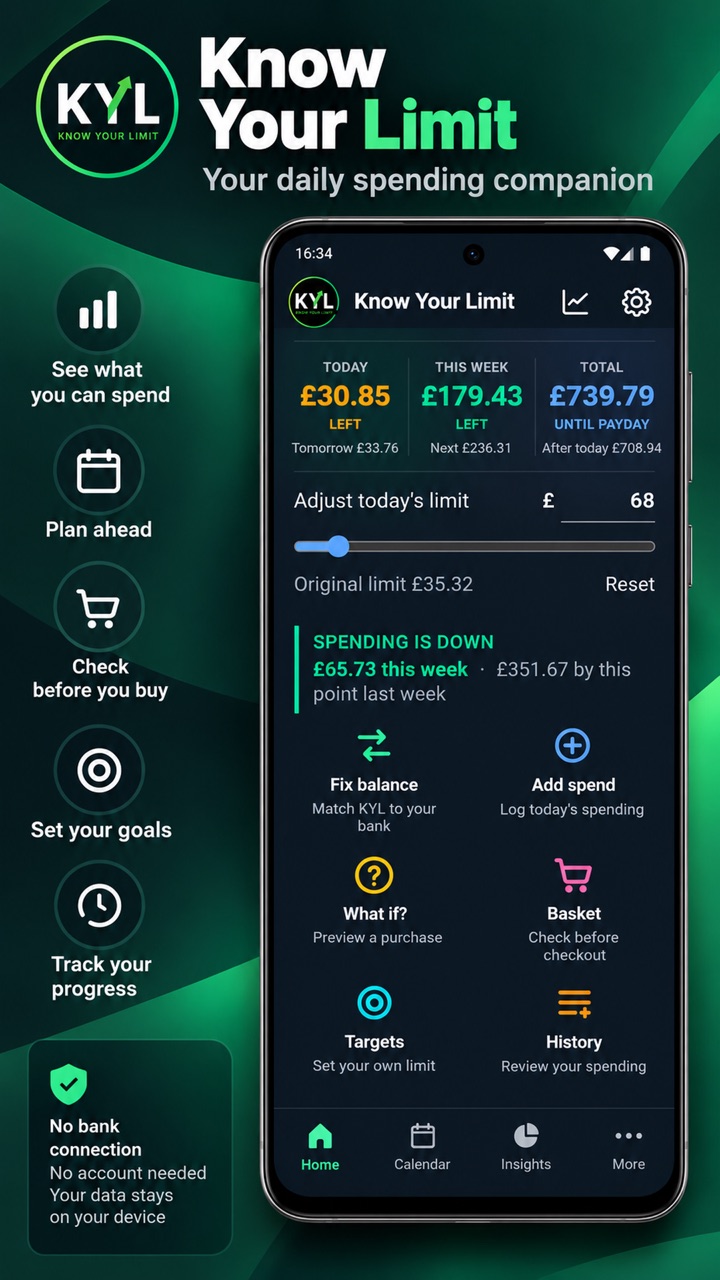
The home screen gives you Left today, This week and Total until payday, along with what tomorrow looks like if you stop spending now.
Fix your balance when life gets in the way
Forgot to log a few things? Type in your real bank balance and tap Fix balance. KYL subtracts the bills still to leave, recalculates what is genuinely yours to spend, and shows you exactly what changed and why. This is what keeps the app useful even in weeks when you do not log every purchase.
Check a purchase before you commit
What if? previews a purchase against the rest of your pay cycle before you buy. Basket builds a running total while you shop, so you know where you stand before you reach the checkout rather than after.
Set a short-term target
Spending targets let you cap yourself at an amount for today, for the next few days, or for specific days you choose. KYL shows you roughly how much you would preserve and what your daily limit would look like afterwards.
See the whole month
The money calendar lays out income, bills and spending day by day. Insights surfaces your biggest purchase since payday, where you spend most, how the last 30 days compare with the 30 before, and how many days you went over your limit.
Check without opening the app
On Android, a home screen widget shows what is left today and what you get from tomorrow. There is also an optional feature that reads purchase notifications from banking and payment apps on your device and offers to log them — you decide whether each one is added or ignored.
Private by design
- No bank connection. KYL never logs in to your bank and does not use Open Banking.
- No account. Nothing to sign up for, no email required.
- No cloud storage. Your figures live on your device or in your browser, not on a server.
- No ads and no tracking. There is no analytics or marketing tracker in the app.
- Your data, exportable. Back up and restore whenever you like — the file is yours.
Read the full privacy policy for the detail, including how the optional Android notification feature works.
Where you can use it
Know Your Limit runs in any modern browser and is free on the web — open it, use it, install it to your home screen if you want to. There is also an Android app, which is a one-time purchase rather than a subscription.
KYL supports pounds, dollars, euros, yen, rupees and Brazilian reais, and it works offline once loaded.
Common questions
How does Know Your Limit work out my daily spending limit?
It takes the money available to you, subtracts the bills still due before your next payday, and divides what is left by the number of days remaining in the cycle. The figure is recalculated every day, so it always reflects what you have actually spent so far.
Do I have to connect my bank account?
No. Know Your Limit never connects to a bank and does not use Open Banking. You enter your income, bills and spending yourself, or correct the app in seconds using Fix balance.
What happens if I forget to log my spending?
Use Fix balance. Enter your current bank balance and KYL reconciles itself against your real position, showing you what it adjusted and why. You do not need a perfect log for the app to stay accurate.
Is Know Your Limit free?
The web version is free to use with no account. The Android app is a one-time purchase, not a subscription.
Does it work outside the UK?
Yes. The app supports pounds, dollars, euros, yen, rupees and Brazilian reais, and payday cycles are set by you rather than assumed.
Where is my data stored?
On your own device, in your browser or app storage. It is not uploaded to a server and it is not shared with anyone. You can export a backup file at any time, and you control where that file goes.
Can I see my limit without opening the app?
On Android, yes — a home screen widget shows what is left today and what you get from tomorrow at a glance.
Is this financial advice?
No. Know Your Limit is a tool for seeing what is left to spend and making clearer day-to-day decisions until payday. It is not financial advice.